Product
Implementer product overview for IFS Cloud projects
Implementer is a self-hosted application that holds an IFS Cloud project in registers (risks, CRIM objects, interfaces, tests, cutover tasks, gates) and generates the IDK documents from them as versioned, hashed files.
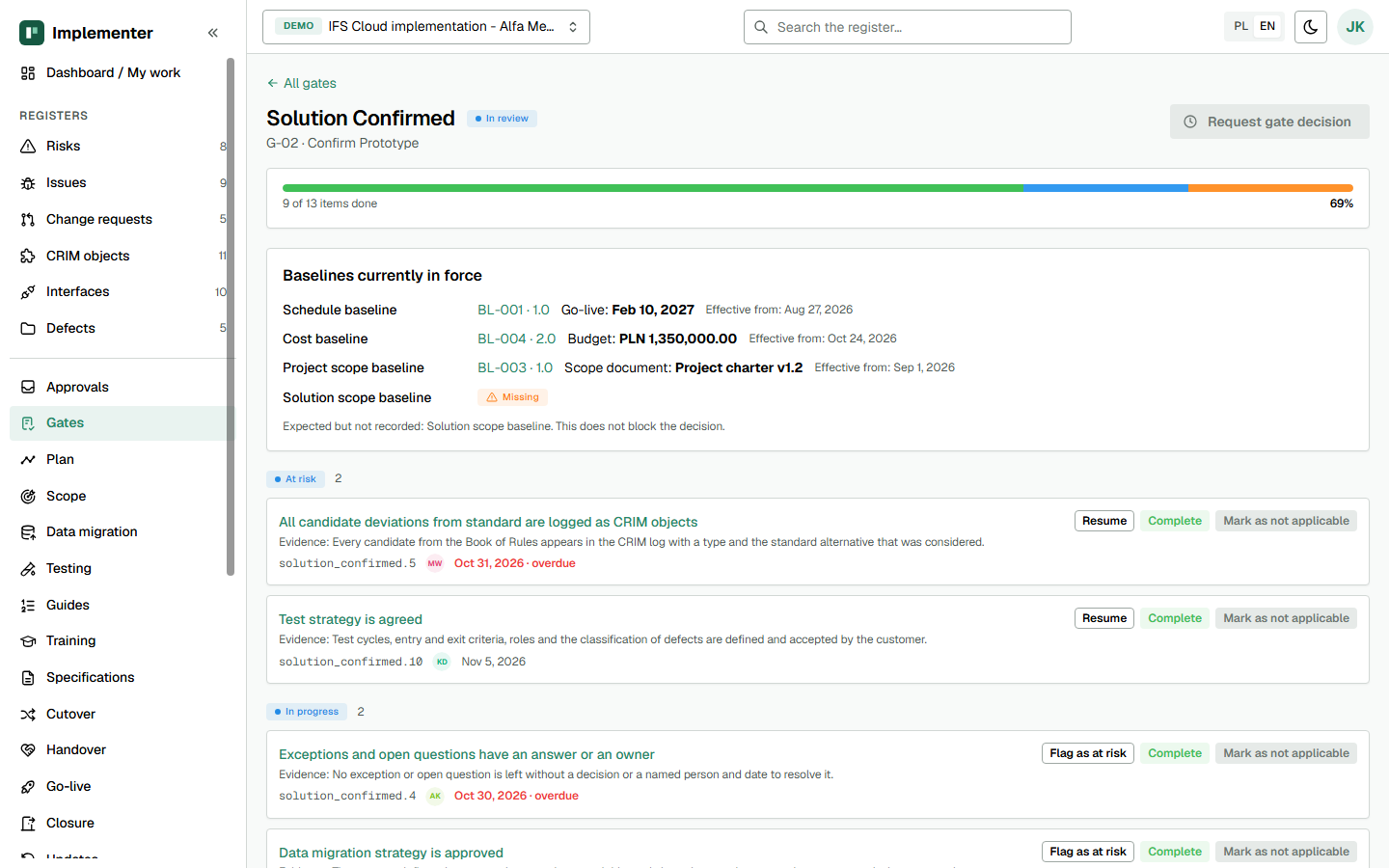
What is Implementer?
Implementer is a web application, delivered as Docker containers that run in your infrastructure, for running IFS Cloud implementation projects. Its core idea is that registers are the source of truth and documents are a view. Nothing from an IDK table is stored as pasted text. Read why in before and after and see the eight problems it targets.
Who is it for?
IFS Cloud project managers, solution architects and customer PMOs, on the customer or the partner side. It supports three project modes, set per project: new implementation, rollout and BAU with Evergreen updates.
What does it do?
| Area | What you get |
|---|---|
| Registers | Risks, issues, change requests, CRIM objects, interfaces, migration objects, test scenarios, cutover tasks, update cycles. Each row has an owner, a state and a history. |
| Gates | Five qualification gates with 61 checklist items, owners and evidence references. A gate decision is Approved, Approved with conditions or Not approved. |
| Go-live readiness | A review with 42 criteria, most of them read from migration, testing, cutover and training data. |
| One way to change state | The same checks run on screen, in the API and in imports. A blocked action says why. |
| Approvals | Rules per project: who may approve, how many approvers, delegation. The requester cannot approve their own step. |
| Audit trail | Who changed what, when and from which source: UI, API, AI, import or sync. |
| Documents | Steering status reports and other IDK documents generated from the registers, versioned and hashed, as PDF or DOCX. |
| Plan and calendar | A read-only Gantt view of phases, milestones and cutover tasks with baseline overlay, and a project calendar of dated items. |
| Import and export | CSV and XLSX register import with a dry-run preview. A whole-project export as one zip with a hashed manifest. |
| Environments | A matrix of what is installed where, with read-only OData checks against IFS Cloud. |
| AI assistant | Permission-aware search, chat with citations and drafts for a person to accept. See AI assistant. |
| Languages | Interface in Polish, English, German and Brazilian Portuguese, light and dark theme. |
How is the methodology configured?
Phases, gates, object types, state machines, approvals, permissions and translations live in a versioned methodology pack (YAML), not in code. The pack in use follows the Implementation Docs Kit, the 24 templates published by the same author. See the IDK kit page for each template.
How is it delivered?
As signed container images behind one reverse proxy, with the implementer-ctl tool for verification, preflight checks, backup, restore, upgrade and support bundles. A pilot host needs 4 vCPU, 16 GB RAM and 100 GB SSD. Sign-in is through Microsoft Entra ID. Details are on the security and trust page.
What does it not do?
- It never writes to IFS Cloud. The connection reads only.
- AI never approves and never changes a status.
- It is not a hosted service: you run it.
- Integrations with Jira, Azure DevOps and MS Project do not exist.
- Teams and Microsoft 365 calendar features are built but not yet proven on a production tenant.
What does it cost?
A pilot starts at EUR 3,450 and the licence at EUR 3,600 per project and year. See pricing and the pilot. Questions are answered in the FAQ, or you can book a scoping call.
Last updated: